How to Create Professional Invoices for Your Business (Free Tool)
Creating professional invoices shouldn't require expensive software or accounting degrees. Whether you're a freelancer, small business owner, or contractor, you need a simple way to bill your clients.
That's why we built a free invoice generator that creates professional PDF invoices in seconds. No signup, no credit card, no strings attached.
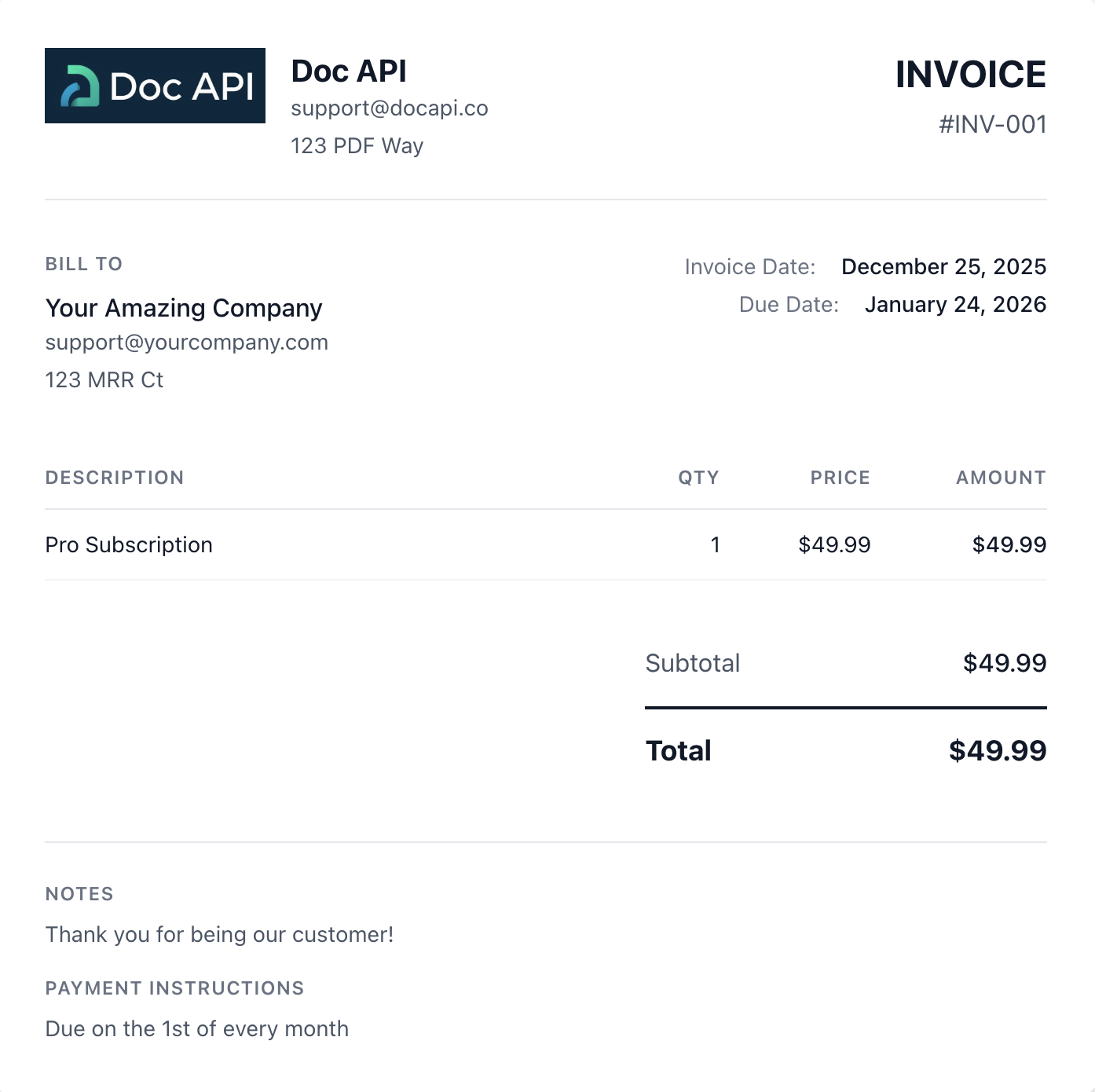
Why Use an Online Invoice Generator?
Traditional invoicing methods have problems:
- Word/Excel templates look unprofessional and are tedious to customize
- Accounting software costs $20-50/month for features you may not need
- Manual invoices waste time and introduce errors
Our free tool solves these issues. You fill in the details, see a live preview, and download a polished PDF.
Step-by-Step: Creating Your First Invoice
1. Enter Your Company Details
Start by filling in your business information:
- Company Name (required) - Your business or personal name
- Email - Your billing contact email
- Address - Where payments should be sent
- Logo - Upload your logo (optional, max 500KB)
Your logo appears in the top-left corner of the invoice, giving it a professional, branded look.
2. Add Client Information
Next, enter who you're billing:
- Client Name (required) - The customer or company name
- Email - Their contact email for invoice delivery
- Address - Their billing address
This information appears in the "Bill To" section of the invoice.
3. Set Invoice Details
Configure the invoice metadata:
- Invoice Number - Use a consistent format like INV-001, INV-002, etc.
- Invoice Date - When the invoice was issued (defaults to today)
- Due Date - When payment is expected (defaults to 30 days out)
Consistent invoice numbering helps with record-keeping and makes you look organized.
4. Add Line Items
This is where you list what you're billing for. Click "Add Item" to add more rows:
- Description - What product or service you provided
- Quantity - How many units
- Unit Price - Price per unit
The tool automatically calculates the total for each line item and the overall subtotal.
Example line items for a web developer:
- Website Development - 1 - $3,000
- Monthly Hosting - 12 - $25
- Domain Registration - 1 - $15
5. Apply Tax Rate
Enter your tax rate as a percentage. Leave it at 0 for tax-exempt services or B2B transactions.
Check your local tax requirements to determine the correct rate for your area.
6. Add Notes and Payment Instructions
Include any additional information:
- Notes - Payment terms, thank you message, or special instructions
- Payment Instructions - Bank details, PayPal address, or payment link
Example notes:
Payment due within 30 days.
Late payments subject to 1.5% monthly interest.
Thank you for your business!
Example payment instructions:
Bank: First National Bank
Account: 1234567890
Routing: 987654321

Or pay via PayPal: [email protected]
7. Preview and Download
As you fill in the form, watch the live preview update in real-time. This shows exactly how your PDF will look.
When you're satisfied, click Download PDF. The invoice downloads instantly to your device.
Features That Make a Difference
Live Preview
See your invoice update as you type. No surprises when you download.
Professional Design
Clean, modern layout that works for any industry. Your clients will take you seriously.
Automatic Calculations
Line item totals, subtotals, tax amounts, and grand totals are all calculated automatically. No spreadsheet formulas needed.
Logo Support
Upload your company logo for branded invoices. Supports PNG, JPG, and other common formats up to 500KB.
Mobile Friendly
Create invoices from your phone or tablet when you're on the go.
No Account Required
No signup, no email collection, no login. Just create your invoice and download.
Tips for Professional Invoices
Be Specific with Descriptions
Instead of "Consulting," write "Marketing Strategy Consultation - Q4 Campaign Planning."
Specific descriptions help clients understand what they're paying for and reduce questions.
Use Consistent Numbering
Adopt a numbering system and stick to it:
- Sequential: INV-001, INV-002, INV-003
- Date-based: INV-2024-001, INV-2024-002
- Client-based: ACME-001, ACME-002
Set Clear Payment Terms
State when payment is due and what happens if it's late. Net 30 (30 days) is standard for most businesses.
Include Multiple Payment Options
The easier you make it to pay, the faster you'll get paid. Include:
- Bank transfer details
- PayPal or Venmo
- Credit card payment links
Keep Records
Save a copy of every invoice you send. You'll need them for taxes and resolving disputes.
When to Use the Free Tool vs. API
The free invoice generator is perfect for:
- Low volume - A few invoices per month
- One-off projects - Contract work, freelance gigs
- Getting started - Testing invoice layouts before automating
Consider our API when you need:
- Automation - Generate invoices from your app or billing system
- High volume - Hundreds or thousands of invoices
- Integration - Connect with Stripe, your database, or CRM
- Customization - Fully custom HTML templates
The same technology powers both. The free tool uses DocAPI under the hood.
Common Use Cases
Freelancers
Bill clients for design work, writing, development, or consulting. Track projects with descriptive line items.
Small Businesses
Invoice customers for products or services. Include your logo for brand recognition.
Contractors
Bill for hourly work with quantity representing hours and unit price as your hourly rate.
Consultants
Create detailed invoices breaking down strategy sessions, deliverables, and expenses.
Event Planners
Invoice for deposits, vendor payments, and service fees with itemized breakdowns.
Frequently Asked Questions
Is it really free?
Yes. No hidden fees, no premium tier required. Generate as many invoices as you want.
Where is my data stored?
Nowhere. Your invoice data is sent directly to our PDF generation service and not stored on any server. Once you close the page, the data is gone.
Can I save my company details for next time?
Currently, the tool doesn't save data between sessions. For recurring invoices, consider bookmarking with your details or using our API for automation.
What file format is the invoice?
PDF. It's universally readable and maintains formatting across all devices.
Can I edit an invoice after downloading?
You'll need to make changes in the form and download again. PDFs are static documents.
Does it work internationally?
Yes. While tax rates are pre-filled for US states, you can enter custom rates for any country. Currency is displayed in USD but you can note different currencies in your descriptions.
Start Creating Invoices
Ready to create your first professional invoice?
Open the Free Invoice Generator
Takes less than 5 minutes. No signup required.
Need Automated Invoice Generation?
If you're building an app that needs to generate invoices programmatically, check out our API:
- Generate unlimited invoices from any programming language
- Use custom HTML templates for complete design control
- Sub-second response times
- 100 free PDFs per month to start